What Is an AI App, and How Can It Keep Personal Data Safe?

An AI app (Artificial Intelligence application) is software that uses AI technologies to understand information, recognize patterns, generate content, answer questions, make predictions, or automate tasks.
For example, AI apps can help with writing, education, translation, image creation, voice recognition, navigation, productivity, and customer support.
How does an AI app handle personal data?
When you use an AI app, you may provide information such as:
- Name or contact information
- Photos or videos
- Voice recordings
- Location information
- Documents or files
- Questions and conversations
- Device and usage information
The important point is that AI itself is not automatically unsafe. The level of privacy depends on what data the app collects, why it collects it, how long it keeps it, who can access it, and whether it uses the data for other purposes such as improving its AI models.
7 ways AI apps can protect personal data
1. Data minimization
An AI app should collect only the information it actually needs. For example, a simple writing assistant shouldn't need access to your contacts or precise location.
2. Encryption
Data should be protected using encryption when it is transmitted and, where appropriate, while stored. This makes unauthorized access more difficult.
3. User consent and permissions
Apps should clearly ask permission before accessing sensitive resources such as the microphone, camera, contacts or location.
4. Data deletion controls
A privacy-friendly AI service should provide ways for users to delete conversations or other stored information where applicable.
5. Limited data retention
The less time unnecessary personal information is retained, the lower the potential impact of a data breach.
6. Strong authentication and access controls
AI companies should protect stored data using measures such as secure authentication and restricted employee access.
7. Transparency
A good AI app should have a clear Privacy Policy explaining what information it collects, how it is used, whether it is shared, and how users can exercise their privacy rights.
What should users do?
Even when an AI app has good security, users should follow the principle:
“If the AI app doesn't need it, don't give it.”
Avoid entering highly sensitive information such as passwords, banking credentials, authentication codes, private documents, or another person's confidential information unless there is a legitimate reason and you understand the service's privacy practices.
Before installing an AI app, check:
Privacy Policy → App permissions → Data collection → Data retention → Data sharing → Deletion options
AI Apps और Personal Data: 10 तरीके जिनसे आप अपनी Privacy सुरक्षित रख सकते हैं
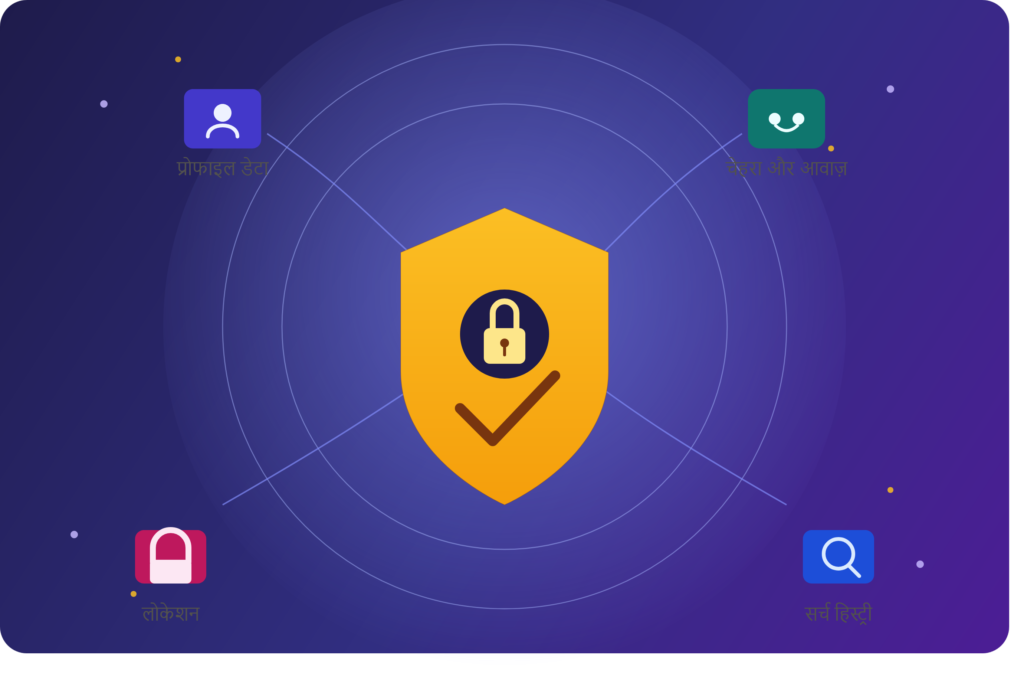
AI apps हमारे रोज़मर्रा के जीवन को आसान बना रहे हैं, लेकिन इनके इस्तेमाल के दौरान personal data की privacy का ध्यान रखना भी बहुत जरूरी है।
- केवल जरूरी जानकारी साझा करें
AI app को उतनी ही जानकारी दें जितनी उसके काम के लिए आवश्यक हो। - Privacy Policy पढ़ें
देखें कि app आपका data कैसे collect, store और use करता है। - App Permissions जांचें
Camera, microphone, contacts और location जैसी permissions केवल जरूरत होने पर दें। - Sensitive information साझा न करें
Password, OTP, banking details और अत्यधिक निजी documents AI app में डालने से बचें। - Data deletion options देखें
ऐसी services को प्राथमिकता दें जो conversations या personal data को delete करने के विकल्प देती हों। - Data retention समझें
पता करें कि company आपका data कितने समय तक रखती है। - Encryption और security देखें
भरोसेमंद AI services आमतौर पर data को सुरक्षित रखने के लिए मजबूत security measures का इस्तेमाल करती हैं। - Third-party sharing की जानकारी लें
Privacy Policy में देखें कि आपका data किसी अन्य company या service के साथ साझा किया जाता है या नहीं। - महत्वपूर्ण जानकारी verify करें
AI का जवाब हमेशा सही हो, यह जरूरी नहीं है। महत्वपूर्ण निर्णयों के लिए information को विश्वसनीय sources से verify करें। - AI को smart assistant की तरह इस्तेमाल करें
AI को उपयोगी सहायता के लिए इस्तेमाल करें, लेकिन personal information साझा करने में हमेशा सावधानी रखें।
निष्कर्ष
AI apps अपने आप में असुरक्षित नहीं हैं। उनकी privacy और security इस बात पर निर्भर करती है कि app कौन-सा data collect करता है, उसका उपयोग कैसे करता है, कितने समय तक रखता है और उसे किसके साथ साझा करता है।
सबसे अच्छा नियम है:
“जिस जानकारी की AI app को जरूरत नहीं है, वह जानकारी उसे न दें।”
इस तरह AI की सुविधा का लाभ लेते हुए आप अपनी personal privacy को बेहतर तरीके से सुरक्षित रख सकते हैं।
AI Scam से कैसे बचें?
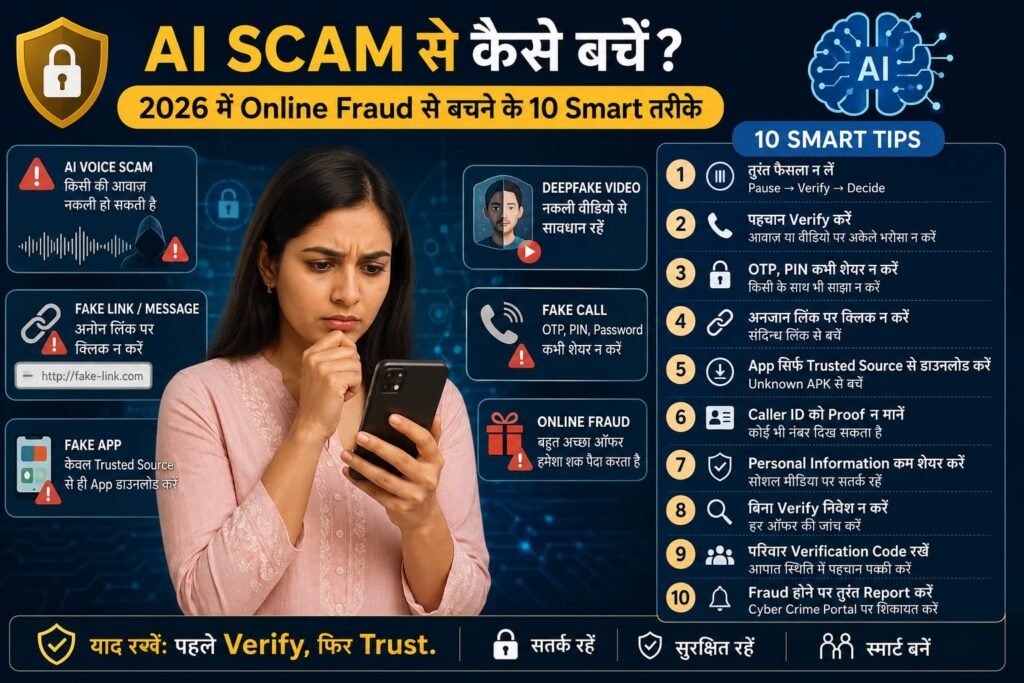
🚨 AI Scam क्या है और 2026 में यह इतना खतरनाक क्यों है?
कल्पना कीजिए कि आपको किसी परिचित की आवाज़ में फोन आता है—
“मुझे तुरंत पैसों की जरूरत है, अभी भेज दो।”
आवाज़ बिल्कुल असली लगती है। लेकिन क्या वह वास्तव में आपके परिचित की ही आवाज़ है?
यही है AI-powered scam का नया खतरा।
Artificial Intelligence ने जहां communication और technology को बेहतर बनाया है, वहीं scammers भी इसका गलत इस्तेमाल करके ज्यादा convincing fraud attempts कर सकते हैं। Fake voice, manipulated images/videos, phishing messages, fake customer-care calls और social-engineering techniques लोगों को भ्रमित करने के लिए इस्तेमाल की जा सकती हैं।
इसलिए 2026 में online safety का सबसे महत्वपूर्ण नियम है:
“जो दिखे या सुनाई दे, उसे Verify किए बिना Trust न करें।”
🤖 AI Scam के प्रमुख प्रकार
AI या modern digital tools से जुड़े scams कई रूप ले सकते हैं:
🎙️ 1. AI Voice Scam
किसी परिचित जैसी आवाज़ बनाकर emergency के नाम पर पैसे मांगना।
🎥 2. Deepfake Scam
किसी व्यक्ति की image या video को manipulate करके misleading content बनाना।
💬 3. AI Phishing
ऐसे messages या emails जो language और design के कारण genuine दिखाई दे सकते हैं।
💼 4. Fake Job Scam
High salary या work-from-home job का लालच देकर पैसे या personal information मांगना।
🏦 5. Fake KYC Scam
Bank account, SIM या wallet बंद होने का डर दिखाकर fake link पर भेजना।
📱 6. UPI Scam
Payment request, QR code या refund के नाम पर गलत transaction करवाने की कोशिश।
🛡️ AI Scam से बचने के 10 Smart तरीके
1️⃣ अचानक आए Emergency Call पर तुरंत पैसे न भेजें
Scammer अक्सर urgency का इस्तेमाल करता है।
उदाहरण:
“मैं मुसीबत में हूं, अभी पैसे भेजो।”
क्या करें?
Call को वहीं verify करने की कोशिश करने के बजाय किसी known/official contact channel से independently confirm करें।
अगर relative के नाम से request आई है, तो उसी व्यक्ति के saved/known number पर अलग से संपर्क करें।
याद रखें:
Emergency + Money Request + Pressure = Verify First
2️⃣ 🎙️ AI Voice पर Blind Trust न करें
AI-generated या manipulated voice की वजह से केवल आवाज़ सुनकर identity confirm करना सुरक्षित तरीका नहीं है।
अगर कोई परिचित पैसे मांगता है:
- Known number पर वापस call करें।
- किसी दूसरे family member से confirm करें।
- Payment recipient का नाम check करें।
- जल्दबाजी में transaction न करें।
Golden Rule:
Voice को नहीं, Identity को Verify करें।
3️⃣ 🔗 Unknown Link पर Click करने से पहले रुकें
एक छोटा-सा message भी phishing attempt हो सकता है।
उदाहरण:
“Your KYC has expired. Update immediately.”
“Your parcel is waiting. Pay delivery fee.”
“You have won a reward. Claim now.”
“Your account will be blocked today.”
ऐसे messages में दिए links पर तुरंत click करने के बजाय संबंधित संस्था की official website या app खुद खोलकर जानकारी verify करें।
4️⃣ 📲 UPI Payment में PIN और Recipient दोनों Check करें
UPI ने payments को आसान बनाया है, लेकिन payment से पहले details check करना जरूरी है।
Payment करने से पहले देखें:
✔️ Recipient का नाम
✔️ Amount
✔️ Payment purpose
✔️ UPI ID
✔️ Payment request का source
बहुत जरूरी:
UPI-PIN, OTP या banking credentials किसी व्यक्ति के साथ share न करें।
अगर कोई व्यक्ति “refund लेने” या “money receive करने” के नाम पर आपको suspicious payment process करने के लिए कहता है, तो पहले उसे verify करें।
5️⃣ 💼 “घर बैठे ₹5,000 रोज़” वाले Job Offers से सावधान रहें
Online job scams में आकर्षक earning का लालच दिया जा सकता है।
उदाहरण:
“No experience required.”
“Daily ₹3,000–₹10,000.”
“पहले registration fee जमा करें।”
“Security deposit के बाद काम शुरू होगा।”
🚩 Red Flags
- बिना proper interview job
- असामान्य रूप से बड़ी income का दावा
- registration fee
- security deposit
- training/software के नाम पर payment
- personal account में पैसा भेजने की मांग
Smart Rule:
Job के बारे में independently company और offer verify करें।
6️⃣ 💰 Guaranteed Investment Profit से सावधान रहें
अगर कोई कहता है:
“100% guaranteed return.”
या:
“Zero risk, huge profit.”
तो तुरंत सावधान हो जाएं।
Scam में शुरुआत में fake profits दिखाकर ज्यादा पैसा जमा करने के लिए pressure बनाया जा सकता है।
हमेशा पूछें:
कंपनी कौन है?
Official website क्या है?
Regulatory information क्या है?
क्या withdrawal conditions स्पष्ट हैं?
क्या मुझे अभी payment करने के लिए pressure दिया जा रहा है?
याद रखें:
Guaranteed high return का मतलब guaranteed safety नहीं है।
7️⃣ ☎️ Fake Customer Care से सावधान रहें
Scammers खुद को bank, shopping platform, courier company या किसी अन्य service का customer-care representative बता सकते हैं।
वे “verification” के नाम पर sensitive information मांग सकते हैं।
कभी share न करें:
❌ OTP
❌ UPI-PIN
❌ ATM PIN
❌ Password
❌ CVV
Safe तरीका:
Customer care number हमेशा संबंधित company की official website/app या official documentation से verify करें।
8️⃣ 📱 Unknown App और Remote Access से बचें
अगर कोई अनजान व्यक्ति कहता है:
“यह app install करिए, मैं आपका problem ठीक कर देता हूं।”
तो तुरंत सावधान हो जाएं।
Unknown व्यक्ति को device access या screen-sharing देने से पहले उसकी identity और support channel verify करें।
Smartphone Safety Checklist:
- केवल trusted sources से apps install करें।
- App permissions review करें।
- Unnecessary apps remove करें।
- Phone और apps update रखें।
- Screen lock इस्तेमाल करें।
9️⃣ 🚨 Digital Arrest जैसी धमकियों से घबराएं नहीं
कुछ scams में caller खुद को police या किसी authority से जुड़ा बताकर डराने की कोशिश कर सकता है।
उदाहरण:
“आपके नाम से illegal activity मिली है।”
“आपको digital arrest किया जा रहा है।”
“Case खत्म करने के लिए payment करें।”
ऐसी स्थिति में caller के pressure में आकर financial information या payment share न करें।
Smart Response:
घबराएं नहीं → call की authenticity independently verify करें → trusted adult/family member को बताएं → उचित official authority को report करें।
🔟 🚨 Scam होने पर तुरंत Action लें
अगर आपको लगता है कि आपके साथ financial cyber fraud हुआ है, तो देरी न करें।
तुरंत:
1. अपने bank/payment provider से संपर्क करें।
2. Transaction details और screenshots सुरक्षित रखें।
3. भारत में cyber-fraud reporting के लिए 1930 पर संपर्क करें।
4. National Cyber Crime Reporting Portal पर शिकायत करें।
सिर्फ “पैसे वापस मिल जाएंगे” कहने वाले किसी unknown व्यक्ति को recovery fee न दें।
🔍 5-Second Scam Detection Test
किसी भी suspicious call, SMS, WhatsApp message या email पर खुद से ये पांच सवाल पूछें:
❓ 1. WHO?
मुझसे संपर्क कौन कर रहा है?
❓ 2. WHY?
वह मुझसे यह काम क्यों करवाना चाहता है?
❓ 3. MONEY?
क्या इसमें पैसे transfer करने की बात है?
❓ 4. DATA?
क्या OTP, PIN, password या personal information मांगी जा रही है?
❓ 5. VERIFY?
क्या मैं इसे किसी independent official source से verify कर सकता हूं?
अगर कई answers suspicious हैं:
🛑 STOP. DON'T PAY. VERIFY.
🔐 अपने Phone को AI Scam से सुरक्षित कैसे रखें?
आज ही ये basic security habits अपनाएं:
✅ Strong Screen Lock
आसान PIN या password के बजाय मजबूत authentication रखें।
✅ Two-Factor Authentication
जहां उपलब्ध हो, enable करें।
✅ Banking Alerts
Transaction notifications ON रखें।
✅ Software Updates
Phone और applications को updated रखें।
✅ Privacy Settings
Social-media accounts की privacy settings check करें।
✅ App Permissions
देखें कि कौन-सा app क्या permission इस्तेमाल कर रहा है।
👨👩👦 परिवार के साथ ये 5 Rules जरूर Share करें
1. OTP कभी share नहीं करना।
2. UPI-PIN किसी को नहीं बताना।
3. Unknown links पर click नहीं करना।
4. Emergency call पर तुरंत payment नहीं करना।
5. Fraud होने पर डरकर चुप नहीं रहना।
एक family member को scam का पता होने से कभी-कभी पूरे परिवार को financial नुकसान से बचाया जा सकता है।
⚡ AI Scam से बचने का Golden Formula
STOP → THINK → VERIFY → ACT
🛑 STOP: जल्दबाजी में action न लें।
🧠 THINK: request सामान्य है या suspicious?
🔍 VERIFY: official source से जांचें।
🛡️ ACT: verification के बाद ही आगे बढ़ें।
❌ इन 10 गलतियों से बचें
| गलती | क्या करें |
|---|---|
| Unknown link खोलना | Official website/app खुद खोलें |
| OTP बताना | कभी share न करें |
| UPI-PIN बताना | Confidential रखें |
| Unknown QR scan करना | पहले purpose verify करें |
| Fake customer care पर भरोसा | Official number verify करें |
| Unknown app install करना | Source और permissions check करें |
| Emergency payment करना | Identity verify करें |
| Guaranteed profit पर भरोसा | Independent research करें |
| Personal details public करना | Privacy settings मजबूत करें |
| Fraud छिपाना | तुरंत report करें |
🏁 निष्कर्ष: AI से नहीं, अपनी जल्दबाजी से सावधान रहें
AI technology अपने आप में समस्या नहीं है। समस्या तब पैदा होती है जब कोई व्यक्ति technology का इस्तेमाल लोगों को deceive करने के लिए करता है।
2026 में online safety के लिए आपको cybersecurity expert बनने की जरूरत नहीं है।
बस कुछ habits अपनाइए:
Click करने से पहले सोचें।
Payment से पहले verify करें।
Information share करने से पहले source check करें।
Emergency request पर independent confirmation लें।
और सबसे महत्वपूर्ण—
🔐 “Trust कम नहीं, Blind Trust कम करें।”
अगर कोई online request आपको डराती है, जल्दी करने के लिए मजबूर करती है या confidential information मांगती है, तो रुकना ही सबसे smart पहला कदम है।